Tag Framework

In 2025, I migrated my main file system to a 13th gen Framework 13. Under this tag, I discuss ways to cope with the Framework's quirks. While much of this will only be relevant to either the Framework or my perhaps somewhat earthy ways of running Debian, I'd hope that much of what I am writing can be useful on other hardware and distributions, too.

  • Waking The Framework Up (And Not)

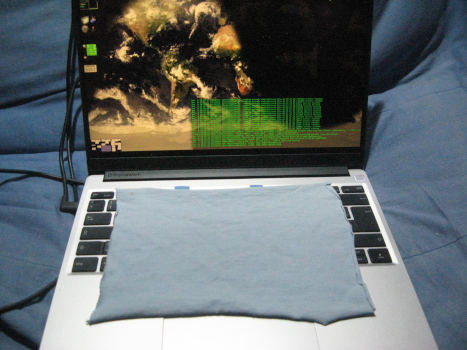
    A notebook computer with a rectangular piece of cloth over the keyboard.

    The piece of cloth in the photo above made all the difference between key prints and a nice, homogeneous display in my old Thinkpad X240. Perhaps my new Framework's metal case is sturdy enough to keep the screen print-free even without extra precautions, but for now I don't want to try.

    However, the cloth sometimes presses keys when the lid is closed, which would wake the machine up. That suggests to me, incidentally, that protecting the screen probably is a smart thing even on the Framework. Anyway: the Framework's firmware makes it wake up both when I open the lid and when (almost) any key is pressed on the built-in keyboard. And that does not fit my interactions with the computer. Hence, I want to configure it to only wake up when I press the power button; lid and keyboard events should be ignored when the machine is in suspend.

    ACPI is a Four-Letter Word

    “No problem”, I thought, “done that before”. The conventional way to select what wakes a machine up from suspend is to echo sometimes slightly intransparent ACPI identifiers into /proc/acpi/wakeup. Each echo toggles whether or not the machine will wake up when some activity occurs on that source; this could be USB or network ports, but also buttons and switches.

    On the Framework, that's not so simple. First off, most of the ACPI identifiers are positively opaque even by ACPI standards:

    $ cat /proc/acpi/wakeup
      Device      S-state   Status   Sysfs node
      AWAC          S4    *disabled
      XDCI          S4    *disabled
      XHCI          S4    *disabled  pci:0000:00:14.0
      HDAS          S4    *disabled  pci:0000:00:1f.3
      I3C0          S4    *disabled
      RP01          S4    *disabled  pci:0000:00:1c.0
      PXSX          S4    *disabled  pci:0000:a9:00.0
      RP02          S4    *disabled
      PXSX          S4    *disabled
      RP03          S4    *disabled
      PXSX          S4    *disabled
      RP04          S4    *disabled
      PXSX          S4    *disabled
      RP05          S4    *disabled
      PXSX          S4    *disabled
      RP06          S4    *disabled  pci:0000:00:1c.5
      PXSX          S4    *disabled  pci:0000:aa:00.0
      RP07          S4    *disabled
      PXSX          S4    *disabled
      RP08          S4    *disabled
      PXSX          S4    *disabled
      RP09          S4    *disabled
      PXSX          S4    *disabled
      RP10          S4    *disabled
      PXSX          S4    *disabled
      RP11          S4    *disabled
      PXSX          S4    *disabled
      RP12          S4    *disabled
      PXSX          S4    *disabled
      TXHC          S4    *disabled  pci:0000:00:0d.0
      TDM0          S4    *disabled  pci:0000:00:0d.2
      TDM1          S4    *disabled  pci:0000:00:0d.3
      TRP0          S4    *disabled  pci:0000:00:07.0
      PXSX          S4    *disabled
      TRP1          S4    *disabled  pci:0000:00:07.1
      PXSX          S4    *disabled
      TRP2          S4    *disabled  pci:0000:00:07.2
      PXSX          S4    *disabled
      TRP3          S4    *disabled  pci:0000:00:07.3
      PXSX          S4    *disabled
    

    (originally, not all of them were disabled). I had hoped for something containing the letters “LID”; I would then have said something like:

    echo LID > /proc/acpi/wakeup
    

    and the machine would have slept on.

    Alas: No LID, nothing I could recognise at all (if you can decode the four-letter words in the Framework's /proc/acpi other than XHCI, please enlighten me). And worse: even when I disabled all sources (which is normally unwise because you can't get the machine to wake up then), the Framework would still wake up on key presses and lid opens.

    Well: ACPI. Four letters that are clearly a botched acronym for “vendors never get it right“.[1] Even the number of characters doesn't match.

    Finding Wakeup Sources in sysfs

    But then there is a second API to communicate wakeup preferences; this is via wakeup files in sysfs, which probably maps directly to hardware rather than through usually broken firmware like ACPI. Here, I am interested in wakeup sources from input devices.

    You might plan on finding them like this:

    find /sys/class/input -name wakeup
    

    But that does not work because find does not follow symlinks, and /sys is full of symlinks. The reason find ignores symlinks by default becomes evident if your override that default:

    $ find /sys/class/input -name wakeup -follow |& head -5
    find: File system loop detected; ‘/sys/class/input/input9/event7/device’ is part of the same file system loop as ‘/sys/class/input/input9’.
    find: File system loop detected; ‘/sys/class/input/input9/event7/subsystem’ is part of the same file system loop as ‘/sys/class/input’.
    find: File system loop detected; ‘/sys/class/input/input9/device/driver/module/drivers/platform:pcspkr’ is part of the same file system loop as ‘/sys/class/input/input9/device/driver’.
    find: File system loop detected; ‘/sys/class/input/input9/device/driver/pcspkr’ is part of the same file system loop as ‘/sys/class/input/input9/device’.
    /sys/class/input/input9/device/subsystem/devices/i2c_designware.1/firmware_node/wakeup
    [... and so on ad infinitum ...]
    

    Fortunately, the locations of the wakeup files are predictable, and thus a plain shell pattern will work:

    $ ls /sys/class/input/*/device/power/wakeup
    /sys/class/input/input0/device/power/wakeup
    /sys/class/input/input1/device/power/wakeup
    /sys/class/input/input2/device/power/wakeup
    

    So, we have three input devices that can raise the machine from the half-dead. Originally, all of them were enabled; on my box, I now have:

    $ cat /sys/class/input/*/device/power/wakeu
    disabled
    enabled
    disabled
    

    Power Button Only, Please

    How did I find out what input is what? Well, I had a look at the names of the devices:

    $ cat /sys/class/input/input0/name
    Lid Switch
    

    This technique furthermore shows that input 1 is the power switch, and input 2 is the keyboard. I have no idea how stable these numbers are over time, models, and kernel and firmware versions; for now, I assume they will not change on reboots and have put the following into my /etc/rc.local:

    echo disabled > /sys/class/input/input0/device/power/wakeup
    echo disabled > /sys/class/input/input2/device/power/wakeup
    

    If the paths turn out to be unstable, I think I'd do some grepping in that script to find, for instance, the path segment for the lid switch:

    grep -i "Lid Switch" /sys/class/inputs/*/name | cut -f4 -d/
    

    would give the lid switch's input path. But let's see if I will need that.

    [1]

    There are, by the way, strong indications that ACPI's brokenness is no accident. In the 2000 Iowa class action suit Comes v Microsoft (eventually won by the plaintiffs), an e-mail by Bill Gates was presented as evidence in which he, in 1999, wondered:

    Maybe we could define the APIs so that they work well with NT and not with the others even if they are open.

    On the positive side: They didn't even work well with Windows NT.

  • Controlling the Battery on the Framework

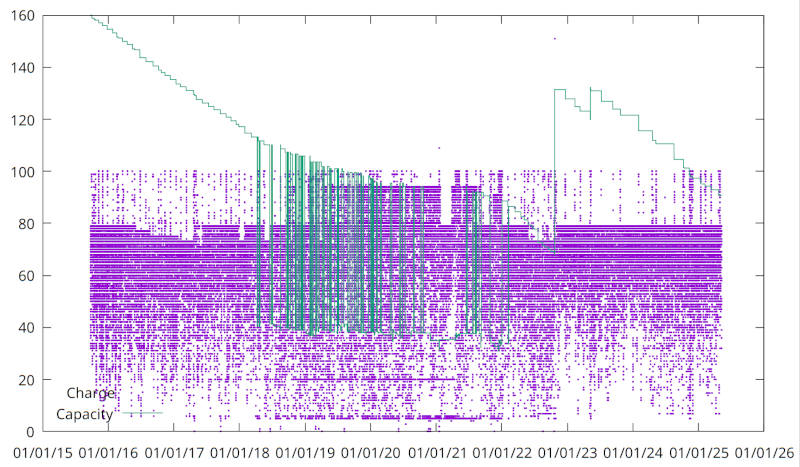
    A plot with capacity as a green line, which has quite a few major jumps but generally a downward slope from 160 down to 80 and then up again to perhaps 120.  There's also a lot of purple dots corresponding to charging levels besteen 100 and 0.

    Charge (purple) and estimated capacity (green) of the large battery in the later life of my old Lenovo X240. The deep dips in capacity were when I used a smaller battery for a while. The main message is: For a long and healthy life of your battery, be nice to it and only rarely charge to 100%[1].

    The figure above shows: If you charge a (notebook) battery to only about 80% unless you have a strong reason to top it up, and don't discharge it too deeply in daily operations, it can keep a good part of its capacity over thousands of cycles.

    Thus, when I got my new Framework, among the first things I wanted to figure out is how to control the charging policy. I was delighted to see that Framework's UEFI firmware already has a menu entry to set a charge limit.

    However, that was not good enough for me, because occasionally I do want to go to 100% for some extra run time (and because I strongly believe that going to 100% is less damaging than going below 20%[2]). I certainly do not want to reboot my machine into the UEFI menu just to request some extra runtime. Thus, I need a userspace tool.

    What I used on the X240 to configure charging limits from within a running machine, tlp, employs Thinkpad-specific mechanisms to talk to its specific embedded controller. Neither is present on the Framework.

    Instead, on the Framework there is a program called ectool (ec as in embedded controller), which somehow derives from something on ChromeOS. Regrettably, I have not found it in any Debian package. The ectool binary that is in coreboot-utils is a different thing, and while it could probably be used to hack together similar functionality, it would be a lot more effort.

    So, I'm afraid you have to build from source. This would work somewhat like this (cave curlbashware; poke me and I'll think about properly packaging it):

    sudo apt install cmake build-essential
    git clone https://github.com/DHowett/ectool.git
    cd ectool
    cmake
    make
    sudo cp src/ectool /usr/local/bin/
    

    Setting the charging limit is then simply a matter of calling ectool fwchargelimit <percent>.

    However, back in the Thinkpad years, when this was a bit more complicated and involved two batteries, I wrote a small wrapper script that lets you quickly switch between travel (topping up), normal (charge to 80%), and nocharge (e.g., when running from an external battery). I liked the <cough> UX of this, and so I ported the script to ectool's facilities. The result is this:

    #!/bin/sh
    if id | grep root 2>&1 > /dev/null
    then
            true
    else
            exec sudo $0 $*
    fi
    
    usage() {
            echo "Usage: $0 [show|travel|normal|nocharge]"
            exit 1
    }
    
    case "$1" in
    show)
            ectool fwchargelimit
            ;;
    travel)
            ectool fwchargelimit 95
            ;;
    normal)
            ectool fwchargelimit 80
            ;;
    nocharge)
            ectool fwchargelimit 10
            ;;
    *)
            usage
            ;;
    esac
    

    I have this as chargeconfig on my path.

    [1]The big jump up around 2022/2023 must have been when I replaced the hardware with a copy I got from eBay and that thing came with another big battery. I had completely forgotten about it, which somewhat weakens my story of the benefits of being nice to the battery. But it does not weaken it much; the purple dots in the plot above show that the battery went through many cycles, and you can see that it still had about half the capacity after eight years (I only started taking this data after two years or so). On that box, even half the capacity on the big battery still meant perhaps 10 hours of a reasonable load mix.
    [2]By the way, an 80% charge corresponds to again more than 10 hours of light duty (such as writing plog posts) on a new 13th Gen Framework 13.
  • Migrated to a Framework 13

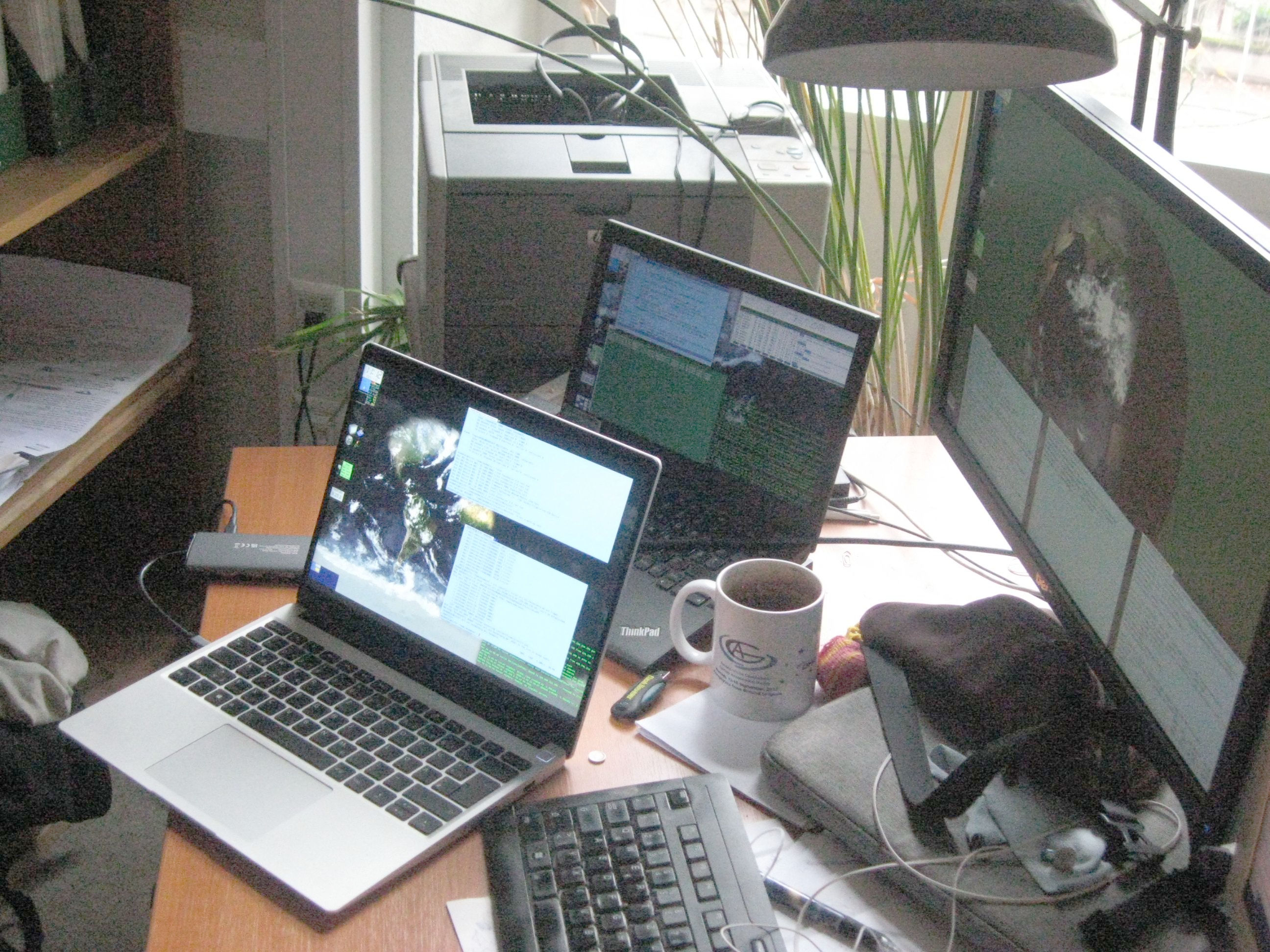
    Zwo notebook computers with glowing displays next to each other. The front one has a much brighter screen.  A stationary monitor is behind both, also glowing quite a bit fainter than the front one.

    My old Thinkpad X240 docked for a last time, and syncing its data to the new Framework 13. The front machine, the one with the blazingly bright display, is the one this post was written on. All previous posts were written on the machine behind it, the one with the dull display.

    I've got a new main computer

    About every ten years, when my old computer falls apart or its ebay-supplied clones feel severely outdated[1], I'm getting myself a new notebook computer to go everywhere I go. Last Wednesday such a historic event took place: I switched the hardware my venerable file system run on to a Framework 13[2] with an Intel “Core Ultra 5 125 H” (gasp) CPU.

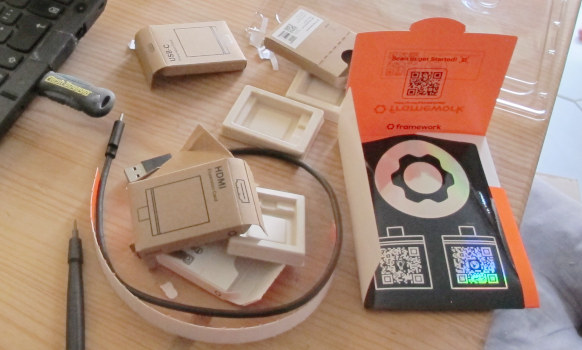
    I thought I'd get a Framework because I finally wanted a metal case, and the promise of a certain modularity and of realistically available spare parts appealed to me. The downside of the Framework's some-assembly-required approach is that when the package had arrived[3], I ended up with lots of little branded boxes on my table. At least much of it is cardboard:

    Scattered empty cardboard boxes about 5 cms in size, a USB cable, and some plastic on a table next to the edge of a notebook computer.

    That almost everything is snapped together with magnets feels a little odd; let's see how I'll like that. I wouldn't have minded screws, I must say.

    But then the biggest annoyance was Intel. Yes, I have asked for it and I could have picked the AMD version. But I was so impressed with the silicon in the X240 that got a lot of computation and graphics done while drawing only about 2 Watts.

    You will need the Ubuntu Kernel and Xorg

    Against that, the Ultraultra thing in this (“13th gen”, I think) Framework was really annoying because I could not, for the life of me, get its graphics part to work with Debian Trixie (and I reckon it is drawing at least 4 Watts – whatever happened to progress?). „Not getting” included hand-building a current kernel and fetching whatever firmware Intel distribute on github.

    It just didn't work. I could get X11 with nomodeset, but since I really need to operate projectors and external monitors, that is no actual option. As soon as the kernel or X11 touched the graphics chip's registers, the best I could hope for was a frozen display; usually, I would just have a black screen. No error messages, except perhaps for the occasional “unknown chipset” in Xorg.0.log, just brokenness and blind guessing.

    In particular this lack of any sort of diagnotics was really frustrating, which made me look for hints on Linux with this architecture online and even with Framework itself (which kernel should work, which Xorg version?). While that did not help much, it made me realise that in stark contrast to all my previous computers, Framework have commercially supported Linuxes. Why don't I look what they do?

    Sure enough, Ubuntu Noble Numbat booted up smoothly (tackily, even including a vendor logo on the boot splash) and ran X11 without a hitch. What? And that on a 6.14 kernel where my 6.16 showed nothing but a black screen?

    Well, under whatever logic it was a working configuration. Even better, the the Ubuntu kernel and Xorg packages install on a Debian Trixie without ruining the whole system. So, that's what I did, and that's the main point of this post: If you'd like to run Debian Trixie on a Framework 13 with <gasp> Intel “Core Ultra 5 125 H” (who invents these stupid names?), drop the following into a (presumably new) file /etc/apt/sources.list.d/ubuntu.sources:

    Types: deb
    URIs: http://archive.ubuntu.com/ubuntu/
    Suites: noble noble-updates noble-backports
    Components: main
    Signed-By: /usr/share/keyrings/ubuntu-archive-keyring.gpg
    

    Then do an apt update and install linux-image-unsigned-6.14.0-1006-oem (or something similar) and xserver-xorg-video-intel.

    To avoid contaminating your system with more Ubuntu packages, once you have done this, immediately move ubuntu.sources out of sources.list.d again and apt update once more for good measure. Shame on you, Intel, for failing to build your software and hardware such that functionality degrades gracefully for at least a few generations.

    Do I Like My New Framework?

    “And what do you think of the box?”, you ask? Ah well. I think I like it that I can apparently program the embedded controller. The metal case feels good. The USB-based expansion pods seem like a good idea now that USB3 should be fast enough for everyone and everything™. I like screen aspect ratio: 16:9 may be good for watching videos, but that's not what I got the computer for. For most other things, the 3:2 ratio feels good, although it is somewhat at odds with the conventional 4:3 that has worked for me for many years, too. More on this in a later post.

    Against that, there's a clickpad. Yikes. On the X240, the clickpad was borderline bearable because the box had a trackpoint and I could turn the clickpad into three tactile buttons with duct tape; On the Framework… ah well.

    The box has far too few LEDs; indicating network activity, disk activity and being in a critical section (e.g., having an encrypted filesystem mounted) is in effect already too much; the power button feels a bit flimsy; the function keys are not grouped, which makes finding the right one without peeking harder than it would need to be.

    Most importantly, the display has a far too high resolution, at least when you want to drive it from a machine that also has to drive normal, 90 dpi, monitors. About my current mitigations I will report in the next post under the framework tag.

    Summing up: Well, I think I'll learn to like the box.

    [1]My previous machine, a Lenovo X240, didn't really feel terribly outdated and was basically fast enough for everything and had enough RAM, too. But even the replacement hardware I got from ebay did fall apart (damn the plastic), and I have to say that Lenovo's stupid whitelisting finally fell on my feet and I felt a moral urge to migrate away from Lenovo.
    [2]

    This is apparently becoming a popular choice. I'm typing this in a regional train to Frankfurt, and across the aisle there's another person with a Framework 13. How unnerving.

    Nachtrag (2025-11-30)

    On the return trip, approaching Würzburg, again a person with a Framework 13. Scary, actually. It seems I'm succumbing to a trend.

    [3]Shockingly, Framework had the thing shipped to me air mail from Taiwan. I, for one, could have waited two weeks for a ship, which would have yielded noticeable savings in the transaction's CO₂ footprint. But then electronics certainly is in the class of goods that have an intrinsic footprint that is so large that air freight doesn't really register.

Seite 1 / 1

Letzte Ergänzungen